What is switch in networking and how it works
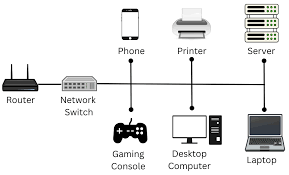
A network switch is a hardware device that connects multiple devices (computers, printers, servers) within a Local Area Network (LAN) using Ethernet cables. It operates at Layer 2 (Data Link Layer) of the OSI model, intelligently forwarding data packets only to the intended destination device using MAC addresses, which increases network efficiency and speed.
How a Switch Works:
- Learning: When a device sends data, the switch records the sender’s MAC address and the physical port it is connected to in a “MAC address table”.
- Filtering & Forwarding: When a packet arrives, the switch examines its destination MAC address. If the address is in its table, it forwards the packet directly to the specific port connected to that device, rather than broadcasting it to everyone.
- Initial Unknowns: If the destination MAC address is unknown, the switch sends the packet out to all ports (flooding) until the recipient responds, allowing the switch to learn the new location.
- Dedicated Bandwidth: Unlike a hub, a switch allows simultaneous conversations between different pairs of devices, providing dedicated, faster bandwidth to each connected device.
Key Components and Types:
- Ports: Physical interfaces (copper or fiber) where cables connect.
- Unmanaged Switch: “Plug-and-play” with no configuration, commonly used for homes/small offices.
- Managed Switch: Configurable for higher security, VLANs (virtual networks), and better traffic control in enterprise environments.
- Layer 3 Switch: Capable of performing routing functions in addition to switching.