How to configure trunk port on cisco switch
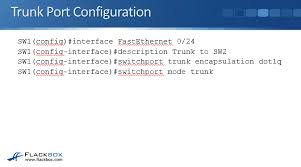
Configuring a Cisco trunk port enables a single physical interface to carry traffic for multiple VLANs between switches using 802.1Q encapsulation. Essential commands involve entering interface configuration mode, setting encapsulation to dot1q (if needed), and changing the port mode to trunk.
Basic Trunk Configuration Commands
text
Switch# configure terminal
Switch(config)# interface
Switch(config-if)# switchport trunk encapsulation dot1q // Required on some older switches [2]
Switch(config-if)# switchport mode trunk
Switch(config-if)# switchport trunk native vlan // Optional: Set native VLAN [2]
Switch(config-if)# switchport trunk allowed vlan // Optional: Restrict VLANs [1, 6]
Switch(config-if)# end
Key Verification Commands
show interface trunk: Displays VLANs allowed on the trunk, native VLAN, and operational status.show interface <interface_id> switchport: Displays detailed switchport configuration.
Key Points
- Encapsulation: 802.1Q is the industry standard.
- Native VLAN: By default, VLAN 1 is the native VLAN (untagged traffic).
- Allowed VLANs: By default, trunks allow all VLANs (1-4094).
- Alternative Method: On modern switches,
switchport trunk encapsulation dot1qis often not required.