How to configure fortinet ap231g without controller
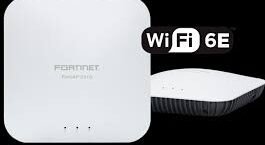
Configuring a Fortinet AP231G without a physical controller (FortiGate) can be achieved by using the FortiLAN Cloud platform, which allows for standalone management. The AP connects to the internet and downloads its configuration from the cloud.
Prerequisites
- Internet Access: The FortiAP must be connected to a network with DHCP and internet access.
- FortiCloud Account: You must have a registered FortiCloud account.
- Device Serial/Key: You will need the serial number and cloud key located on the back of the device.
- Power: A PoE adapter or injector.
Step-by-Step Configuration (FortiLAN Cloud)
- Register the Access Point:
- Log in to your FortiLAN Cloud account at fortilan.forticloud.com.
- Navigate to Devices > Inventory Devices.
- Click Access Points > Add APs.
- Enter the device’s cloud key or serial number to add it to your inventory.
- Create an AP Network:
- On the Home page, create a new AP Network (this acts as a logical group for your settings).
- Set the timezone and credentials for local access.
- Configure SSID and Security:
- Within your AP Network, navigate to the configuration section to set up your Wi-Fi name (SSID).
- Define security settings (e.g., WPA2/WPA3 Personal).
- Deploy the AP:
- Go back to the Inventory page, select your AP231G, and click Actions > Deploy.
- Assign it to your newly created AP Network.
- Connect the AP:
- Plug the FortiAP into the network. It will receive an IP via DHCP, contact the FortiCloud, and download the configuration you just created.
Alternative: Local Standalone Configuration
If you do not want to use the cloud, you can configure it directly.
- Direct Connection: Connect a computer directly to the FortiAP using an Ethernet cable.
- Access GUI: Set your computer to IP
192.168.1.3(or similar in that range), open a browser, and navigate tohttps://192.168.1.2. - Login: Use username
adminwith no password. - Configure: Navigate to Local Configuration to set up SSIDs, security, and networking (bridging the traffic to your network).
Note: In standalone mode, some advanced features (like fast roaming or centralized security policies) may not be available compared to controller-based management.