How to configure BGP in cisco router
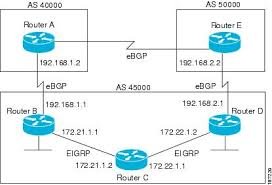
Configuring BGP on a Cisco router involves initiating the BGP process with router bgp <AS_number>, defining neighbors using neighbor <IP> remote-as <AS_number>, and advertising networks with the network command. For IPv4, use address-family ipv4 to activate neighbors, while ensuring necessary IP connectivity and, for EBGP, proper route policies.
Basic BGP Configuration Steps
- Enter Configuration Mode:
configure terminal - Enable BGP Process:
router bgp <your-AS-number> - Define Router ID (Optional but Recommended):
bgp router-id <IP-address> - Configure Neighbor:
neighbor <neighbor-IP> remote-as <neighbor-AS-number> - Activate Neighbor (IPv4):
address-family ipv4
neighbor <neighbor-IP> activate
exit-address-family
``` [1]
Advertise Networks: network <network-IP> mask <subnet-mask>
Example: Configuring EBGP between R1 and R2
- R1 Configuration (AS 100):
router bgp 100
 bgp router-id 1.1.1.1
 neighbor 192.168.12.2 remote-as 200
 address-family ipv4
  network 10.1.1.0 mask 255.255.255.0
  neighbor 192.168.12.2 activate
 exit-address-family
R2 Configuration (AS 200):
router bgp 200
 bgp router-id 2.2.2.2
 neighbor 192.168.12.1 remote-as 100
 address-family ipv4
  network 172.16.1.0 mask 255.255.255.0
  neighbor 192.168.12.1 activate
 exit-address-family
Verification Commands
show ip bgp summary: Checks neighbor status (look for a numeric State/PfxRcd, not Active)show ip bgp: Displays the BGP tableshow ip bgp neighbors <IP> advertised-routes: Shows routes sent to a neighbor
Key Considerations
- IBGP vs EBGP: If
remote-asis the same as your AS, it is IBGP; if different, it is EBGP. - Loopback Addresses: Use Loopback interfaces for neighbor establishment to improve stability.
- Next-Hop-Self: For IBGP, use
neighbor <IP> next-hop-selfto ensure proper routing. - Authentication:
neighbor <IP> password <string>can be used for MD5 authentication.