How to install software in ubuntu using terminal
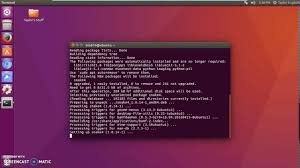
S1. Using the apt command (Recommended for most software)
This is the standard and safest method, drawing software from the official Ubuntu repositories.
- Open the Terminal: Press
Ctrl+Alt+Ton your keyboard. - Update the package list: This ensures you have the latest information about available software.bash
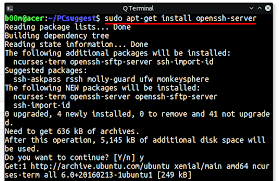
sudo apt update - Install the software: Replace
<package_name>with the name of the software you want to install (e.g.,vlc).bashsudo apt install <package_name> - Confirm installation: When prompted, type
Yand pressEnterto proceed.
Useful apt commands:
apt search <keyword>: Searches the repositories to find the correct package name if you are unsure.sudo apt upgrade: Upgrades all installed packages to their newest versions after updating the list.sudo apt remove <package_name>: Removes the software, but keeps its configuration files.sudo apt purge <package_name>: Completely removes the software and its configuration files.sudo apt autoremove: Removes any unneeded dependencies that were installed automatically with other software and are no longer required.
2. Installing a local .deb file
Sometimes, software is downloaded directly from a website as a .deb file (like Google Chrome). It’s FOSS
- Open the Terminal.
- Navigate to the file’s directory: For example, if it’s in your
Downloadsfolder:bashcd Downloads - Install the file: Use
sudo apt install ./<filename>.deb, replacing<filename>with the actual file name. The./is important.bashsudo apt install ./google-chrome-stable_current_amd64.debUsingapt installwill also attempt to resolve and install missing dependencies, which the olderdpkg -icommand does not.
3. Using Snap packages
Snaps are a universal packaging format developed by Canonical, the makers of Ubuntu. They include all dependencies and update automatically.
- Open the Terminal.
- Install a snap package:bash
sudo snap install <package_name> - List installed snaps:bash
snap list - Remove a snap package:bash
sudo snap remove <package_name>
For general users, sticking to the apt command or the built-in Ubuntu Software center is the best approachoftware in Ubuntu is primarily installed using the apt package manager in the terminal. This method is recommended as it handles dependencies and ensures compatibility with your system.
Here are the main methods to install software using the terminal: