How to configure trunk port on fortigate firewall
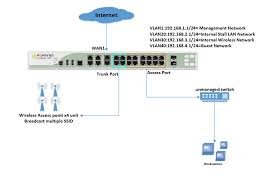
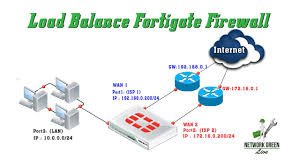
Configuring a trunk port on a FortiGate firewall involves creating VLAN sub-interfaces on a physical interface to carry multiple VLANs (tagged traffic) to a switch, or configuring a FortiSwitch port via the GUI. Key steps include creating VLAN interfaces with specific VLAN IDs, assigning them to a physical port, and assigning IP addresses to each VLAN sub-interface.
Method 1: Configuring Trunk Ports via GUI (For VLANs)
To enable a port to handle multiple tagged VLANs (standard trunking):
- Remove the Port from Switch/Bridge: Ensure the physical interface (e.g.,
port1) is not part of a hardware switch or Bridge interface (Network>Interfaces). - Create VLAN Sub-interfaces:
- Go to Network > Interfaces and click Create New > Interface.
- Name: Give a name (e.g.,
VLAN10). - Type: Select VLAN.
- Interface: Select the physical port (e.g.,
port1). - VLAN ID: Enter the ID (e.g.,
10). - IP/Netmask: Assign an IP address for that VLAN (e.g.,
192.168.10.1/24).
- Repeat step 2 for all required VLANs on the same physical port.
Fortinet +4
Method 2: Configuring 802.3ad Link Aggregation (FortiSwitch)
If you are connecting a FortiGate to a FortiSwitch and want to aggregate ports (LACP):
- Go to WiFi & Switch Controller > FortiSwitch Ports.
- Click Create New > Trunk.
- Enter a Name, select physical ports, and choose the mode (e.g., Active LACP).
Method 3: CLI Configuration
config system interface
edit “VLAN10”
set vdom “root”
set interface “port1”
set vlanid 10
set type vlan
set ip 192.168.10.1 255.255.255.0
set allowaccess ping https ssh
next
end
Note: The physical interface (port1) does not require an IP address, only the VLAN sub-interfaces.
Key Considerations
Native VLAN: By default, untagged traffic on the interface is allowed. This can be configured as the native VLAN on the connected switch.
Security Policies: You must create firewall policies to allow traffic to flow between VLANs or between a VLAN and other interfaces.
FortiLink: If using FortiLink to manage switches, the trunking is handled automatically under the FortiLink interface.