What is intune?
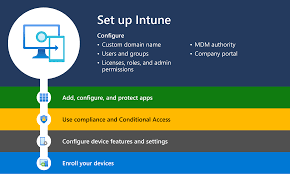
Microsoft Intune is a cloud-based unified endpoint management service that secures and manages mobile devices, desktop computers, and applications
As part of the Microsoft 365 suite, it enables IT to control data access on both corporate and Bring Your Own Device (BYOD) setups. It is used for enforcing security policies, managing app deployment, and facilitating remote work, replacing traditional on-premises management.
Key Aspects of Microsoft Intune:
- Core Capabilities: Intune provides both Mobile Device Management (MDM) and Mobile Application Management (MAM). It allows administrators to configure, enroll, and monitor devices, ensuring they comply with company security policies.
- Support Platforms: It supports Windows (10/11), Android, macOS, iOS, and Linux operating systems.
Security & Compliance: Intune integrates with Microsoft Entra ID(Azure Active Directry) to enforce conditional access, restricting access to company data to compliant, managed devices.
- BYOD & Privacy: It helps protect company data on employee-owned devices by separating business data from personal data, ensuring privacy while maintaining security.
- Cloud-Native Management: Unlike traditional group policies (GPOs) that require VPNs, Intune
- operates via the cloud, making it ideal for managing remote or hybrid workforces.
Intune is available through Microsoft 365 E3/E5/F1/F3, Enterprise Mobility + Security E3/E5, and Business Premium subscriptions.
What Are the Benefits of Microsoft Intune?
Intune offers the following key benefits to users:
- Integrated Endpoint Management
Platform Ensure all your company-owned and bring-your-own (BYOD) devices are managed and always up to date with the most flexible control over any Windows, Apple, and Android devices. - Most secure, desktop mobile experiences
Precisely control how users access and utilize data in Office 365 and other mobile apps with integrated data protection and compliance capabilities. - Secure your data on any device even those you don’t control
Whether it is a company-managed, employee, managed or 3rd party managed device you have the flexibility and control to manage who gets access to it. - Best, most productive user experience
Microsoft Intune provides the Office experience your workers expect without compromising user productivity.
By understanding what are the benefits of Microsoft Intune, organizations can better align their IT infrastructure with productivity and security goals.
How Does Microsoft Intune Work in a Business Model or Integrate with Azure Active Directory?
How Microsoft Intune works is through integration with Microsoft Azure Active Directory and Microsoft 365, allowing secure access policies, remote device management, and compliance enforcement. Microsoft Intune is a cloud-based service that allows you to remotely manage mobile devices and mobile applications. One of the biggest benefits of Intune is that you can have an ultra-productive mobile workforce without worrying about the security of your organization’s data.
What Does Intune Help Companies Achieve?
Microsoft Intune helps Business Central partners achieve more in the following ways:
- Manage your diverse mobile ecosystem from the cloud.
- Protect your data while maintaining productivity.
- Choose what data different users can access and what they can do with it.
- Integrate with Microsoft 365’s Cloud tools and leverage the Cloud securely.
- Achieve IT efficiencies in the cloud.
- Stay updated with a highly scalable cloud service architecture.
- Leverage the cloud for intelligent insights on policies and configuration.
- Integrate with Microsoft Azure and ensure enterprise security.
- Create the most productive Microsoft 365 environment for users to work on devices and apps they choose, while protecting data.
- Let employees choose devices and apps with intuitive, self-service support and deployment.
- Enable workforce mobility through Business Central implementation.
These are core features of Microsoft Intune that contribute to its widespread adoption across industries.
Microsoft Intune for Mobile Device Management
With its robust capabilities, Microsoft Intune mobile device management ensures security and compliance across a wide range of user endpoints. Microsoft Intune for mobile device management helps IT teams define policies, deploy apps, and ensure sensitive data is secure, whether on corporate or personal devices. It has become a critical component for modern hybrid workplaces.
Exploring Key Capabilities
Some of the top Microsoft Intune features include:
- Application protection policies
- Conditional access integration
- Compliance and configuration profiles
- Device enrollment and provisioning
- Remote wipe and device retirement options
- Role-based access control
Licensing and Cost
Wondering how much does Microsoft Intune cost? It is available as part of Microsoft 365 E3 and E5 licenses or can be purchased separately, starting at a competitive per-user, per-month pricing model depending on the feature set required.
Why Korcomptenz?
Korcomptenz, as a Microsoft Gold Partner, helps Business Central partners migrate from Office desktops to hosted desktops, starting with a complimentary consultation process. We offer a variety of DaaS (Desktop as a Service) solutions, including hosted desktops, highly customizable security policies, flexible data storage services, Microsoft mobile device management Intune support, and more.
Request a Consultation Now to modernize your device management with Microsoft Intune