How to configure routing between two networks
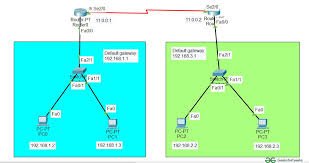
Configuring routing between two networks requires connecting them via a router or Layer 3 device and defining the path for traffic using static or dynamic routes. The process involves assigning distinct IP subnets, setting unique gateway IP addresses on the router for each network, and configuring static routes (ip route) on each side to recognize the remote network’s address.
Key Steps to Configure Routing:
- Assign IP Addresses: Ensure the two networks (e.g.,
and
) are in different subnets.
- Configure Router Interfaces: Connect both networks to a router or Layer 3 switch. Assign an interface IP address for each network; this IP acts as the default gateway for the hosts in that network.
- Configure Static Routing: On the router, add a static route for the first network to reach the second network, and vice versa.
- Example (Cisco CLI):
ip route [destination_network] [subnet_mask] [next_hop_ip].
- Example (Cisco CLI):
- Configure Default Gateways: Ensure all devices (PCs, servers) in both networks have their default gateway set to the corresponding router interface IP address.
Common Approaches:
- Router on a Stick: Using one router interface to route between different VLANs.
- Layer 3 Switch: Enabling IP routing on a switch to handle inter-VLAN traffic.
- RRAS/Server with Two NICs: Configuring a server with network interface cards in both networks to act as a router.
Verification:
Use the ping command from a host in one network to a host in the other network to verify connectivity.