How to configure vlan in cisco switch
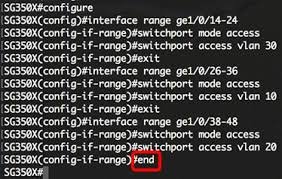
To create a VLAN on a Cisco switch, enter global configuration mode, type vlan [ID], name it, and assign ports using switchport mode access and switchport access vlan [ID]. Common commands include vlan 10, name Sales, interface fa0/1, switchport mode access, and switchport access vlan 10. Verify using show vlan brief.
Steps to Create and Configure a VLAN (CLI)
- Enter Configuration Mode:text
Switch> enable Switch# configure terminal - Create the VLAN and Name It:text
Switch(config)# vlan 10 Switch(config-vlan)# name Engineering Switch(config-vlan)# exit - Assign Ports to the VLAN:text
Switch(config)# interface fastEthernet 0/1 Switch(config-if)# switchport mode access Switch(config-if)# switchport access vlan 10 Switch(config-if)# exit - Verify the Configuration:text
Switch# show vlan brief
Key Considerations
- VLAN ID Range: Valid VLAN IDs are 2-4094, as 1 and 1002-1005 are reserved.
- Interface Ranges: Use
interface range fa0/1 - 10to assign multiple ports at once. - Default VLAN: By default, all ports are in VLAN 1.
- Voice VLANs: Use
switchport voice vlan [ID]for VoIP phone setups. - Alternative Configuration: For Cisco Small Business (SMB) switches, use the web-based utility under VLAN Management > VLAN Settings.